
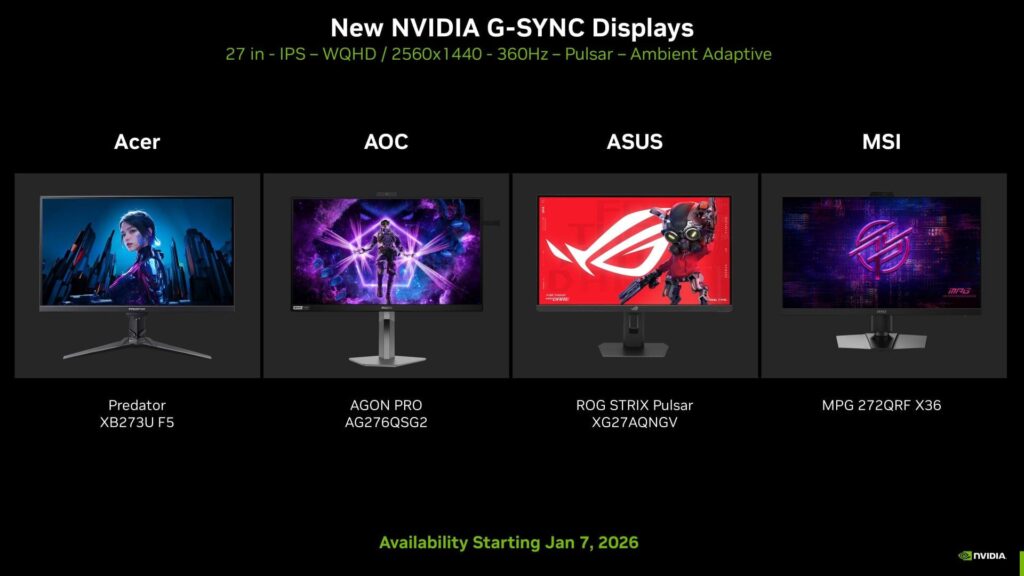
Reviewers were impressed by NVIDIA’s new G-SYNC Pulsar monitors for their exceptional motion clarity. However, they noted a significant issue: when games ran below 90 FPS, the on-screen content would appear twice, causing sharp double images resembling extreme ghosting or strobe crosstalk. The good news is that NVIDIA has recently rolled out a new firmware update to address the double-image artifacts and other related issues.
Read on to learn more about this update.
Key Features of the Firmware Update for G-SYNC Pulsar Monitors
The latest firmware update for G-SYNC Pulsar monitors was launched on March 13, 2026. Jacob Freeman, an NVIDIA Evangelist, made the announcement about this update.
The G-SYNC Pulsar firmware update, version 1.1.4, is now available for the following models:
- Acer Predator XB273U F5
- AOC AGON PRO AG276QSG2
- ASUS ROG STRIX Pulsar XG27AQNGV
- MSI MPG 272QRF X36
Users with these monitors are encouraged to update to the latest firmware version. This update specifically addresses the double-image artifacting and FPS indicator issues, particularly noticeable when games run below 90 FPS. Additionally, NVIDIA has introduced a new feature called Fixed 60Hz Strobing Mode, catering to users who play games at a locked 60 FPS. Some extra Pulsar optimizations have also been included in this update.
Installation Guide for the New Firmware Update on G-SYNC Pulsar Monitors
Follow these steps to install the updated G-SYNC Pulsar firmware version 1.1.4:
- Visit the NVIDIA G-Sync Pulsar firmware page and select “Update Monitor”.
- Click on the “Check” button next to “Check version and update”.
- Agree to the NVIDIA Firmware Licensing agreement and click on “Start”.
- Select the appropriate monitor model.
- Connect your PC to the monitor using a USB cable.
- Once connected, click on “Next step”.
- Access the on-screen menu using the monitor’s keys and navigate to System Setup > All Reset > Firmware Update Mode.
- Click on the “Allow web browser to connect” button to initiate the firmware update process.
The update typically takes around 5-10 minutes, depending on the model, and the system will restart upon completion.
Edited by Niladri Roy